Stock control
Beauty stock control: multi-shop inventory, reorders, testers
Every serum, palette and refill, counted at every shop and storeroom. Each change to stock is recorded with its reason — a sale, a refund, a transfer, a count, a tester — so the number on the screen can always explain itself.
Free during early access · no card neededUpdated
Every shop
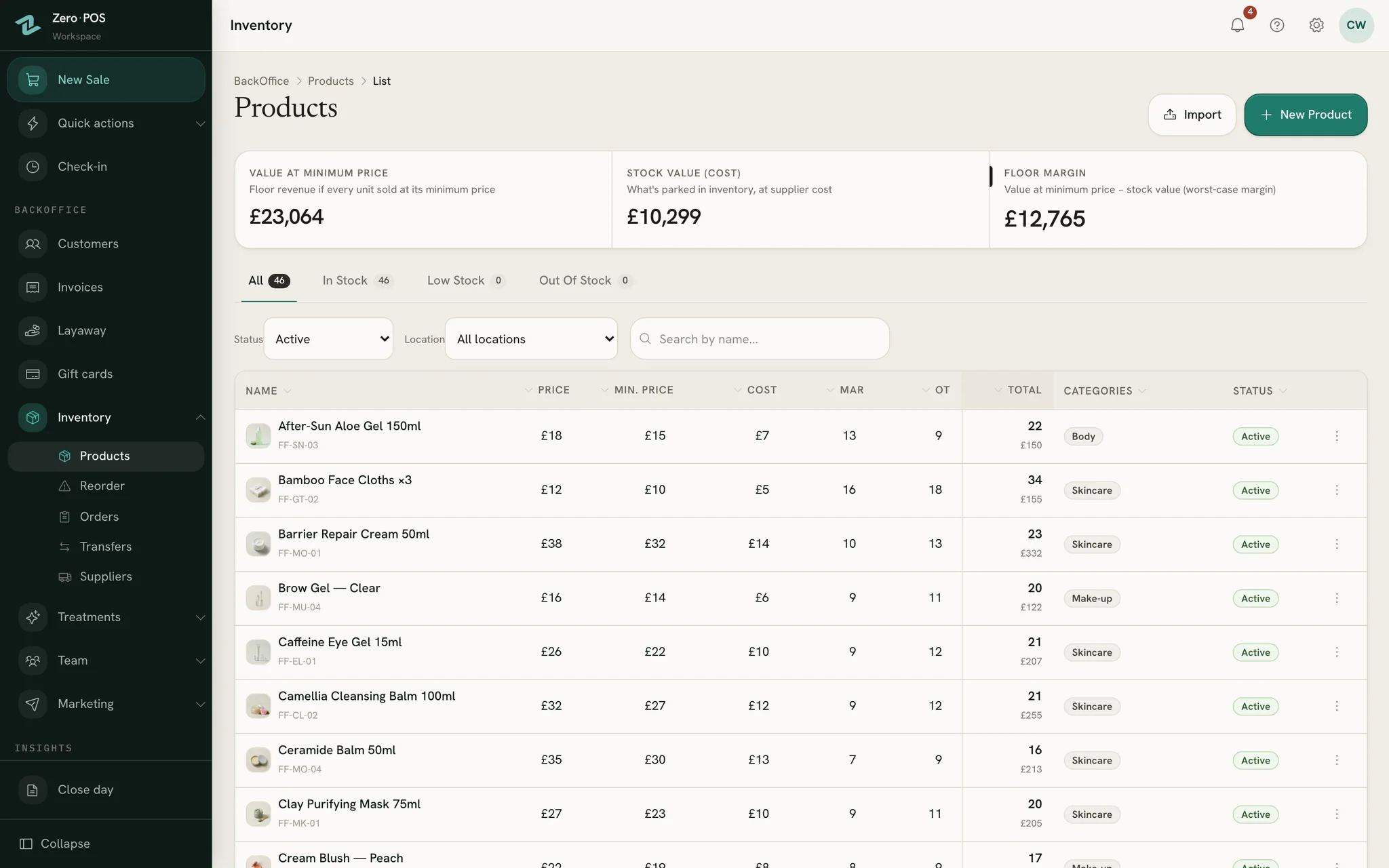
One list, every shop’s count
A product is added once, with its prices and the stock each shop holds today. From then on the list shows what is on every shelf, and what is running out.
Each shop’s own count
Tick the shops that carry a product and type each one’s opening stock. A storeroom holds stock and takes transfers without ever selling.
Fix a number where you see it
Click a price or a count on the list and type the new one. For one shop, with a reason, Stock adjust adds, removes or sets the quantity.
Transfers between shops
Send several products from one shop or storeroom to another in one go. Both counts change in the same moment, and no money moves.
Every change explains itself
Each movement is logged with who made it and why, and the Stock Movements report lists them all: sales, counts, transfers, deliveries, testers.
Low stock, shop by shop
In stock, low and out of stock tabs show what is running down. When a shop reaches a product’s threshold, managers can get an alert.
Cost kept private
A cost price on each product feeds the margin reports. Only the roles you allow ever see it: never sellers at the till, never a receipt.
Counts and testers
Count blind, see what goes missing
People who can see the expected number tend to find it. So the stock-take hides it, and Zero POS compares only once the count is in.
A blind stock-take
Open Stock-taking at the shop you are counting.
Type what you really counted for each product. Leave a row empty if you didn’t count it.
Submit and validate: the differences go into stock at once, for the roles allowed to validate.
Read the results: what the system expected, what you counted, and the difference.
Testers and damaged stock
- Record a tester the day you open it, so the shelf count stays right.
- Mark stock that arrived broken as defective; a note can say why.
- Both come off stock at once; nothing is charged and the takings don’t change.
- The variance report shows which products come up short, count after count.
Your product list
Bring the whole catalogue in one go
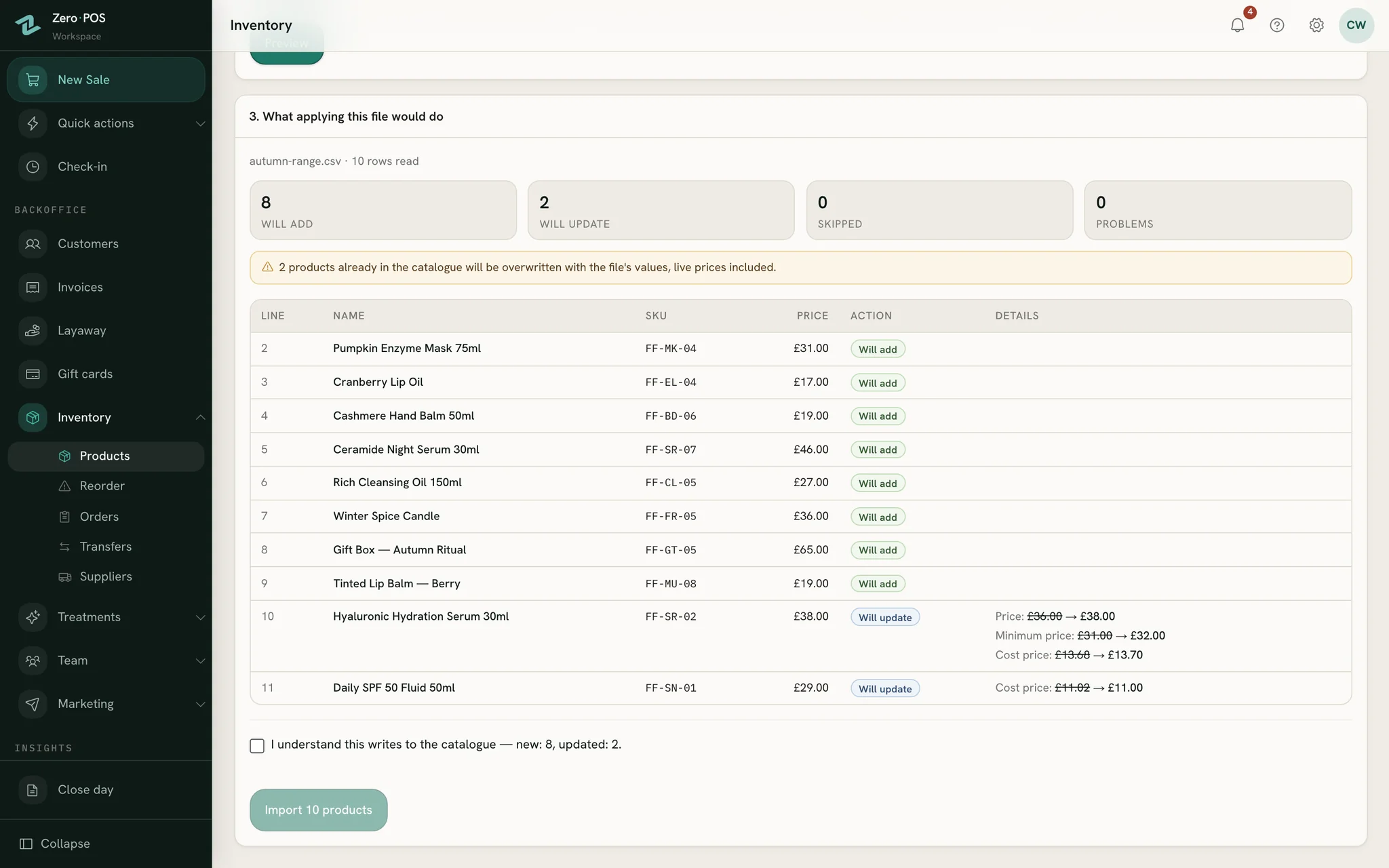
Already keep your products in a spreadsheet, or in the till you are leaving? Import them all, read exactly what will happen first, and nothing is written until you say so.
Importing a spreadsheet
Download the template and fill in one row per product, with each shop’s opening stock.
Upload it and read the preview: will add, will update, skipped or a problem, row by row.
Import: the whole file goes in at once, or none of it does.
Spot a mistake? Undo takes back what the import created, as long as it hasn’t been sold or moved since.
- Columns are matched by their heading, so “Sale price”, “RRP” or “PVP” all count as the price.
- Send us your product list and we import it for you, free during early access.
Reorders and deliveries
Order what’s low, receive it where it belongs
Purchase orders keep the paperwork of buying stock: who from, what, for which shops and at what cost. Stock only changes when the delivery is received.
From low shelf to full shelf
The reorder list shows every product at or below its minimum at each shop, with a quantity that brings it back to twice that.
Tick the rows you want: a draft order opens, already filled in.
Split each line across your shops, and add shipping, customs or a discount.
When the goods arrive, check the order and receive it: each shop’s stock goes up by its share.
- Suppliers keep their contact details, currency and payment terms.
- An expected date on each order shows what is still on its way.
- Received one by mistake? Reverse it, and the units come off every shop again.
Questions
Asked before signing up
Can I see every shop’s stock at once?
Does a product that runs low stop selling?
Can I undo a transfer between shops?
Where do testers show up?
Can you import our product list for us?
More of Zero POS
What works alongside it
Cash up
Count each payment method against the till, see what’s over or short, print the slip.
Layaways
Put it aside with a deposit, take the rest in instalments, hand it over as it’s paid.
Free tools for the same job
Count your shelves with Zero POS
Start a free workspace, add your shops and import your product list, or send it to us and we import it for you. Nothing is charged during early access.
Free during early access · no card needed
Already use Zero POS? Sign in